









USB Safe Guard
Change general USB to Secure USB, Secure USB is only available to authorized users and Remote USB control availablexSecuritas is certified with ISO 27001:2022 and SOC2 Type II, confirming that our security controls, development processes, and operational practices meet internationally recognized standards. These certifications provide additional assurance for enterprises that require strict compliance and secure handling of sensitive information.


Key Features
Protected USB with Adjustable Security
- You can change the generic USB Hard Disk or USB Flash Disk to an encrypted secure USB.
- A Secure USB is 5MB less than the normal USB size.
- The documents are hidden in a secure USB, which can be retrieved only by entering the password.
- You can change the policy for this secure USB even after creating a secure USB.
Option when creating secure USB
- Can set the read / write password and the read-only password respectively.
- There is an option to use secure USB only when connected to the Internet.
- You can set an expiration date.
- You can set the number of expirations.
- After expiration, you can automatically dispose of secure USB.
- If you do not use your PC for a certain period of time while you are using secure USB, it will automatically shut down the secure USB.
- If the password is wrong several times, you can automatically discard the secure USB.
USB Protection & Management
- If you lose your secure USB, you can automatically destroy this secure USB.
- You can view logs for a secure USB in real time.
- You can change the secure USB to generic USB. In this case, all contents of secure USB will be deleted.
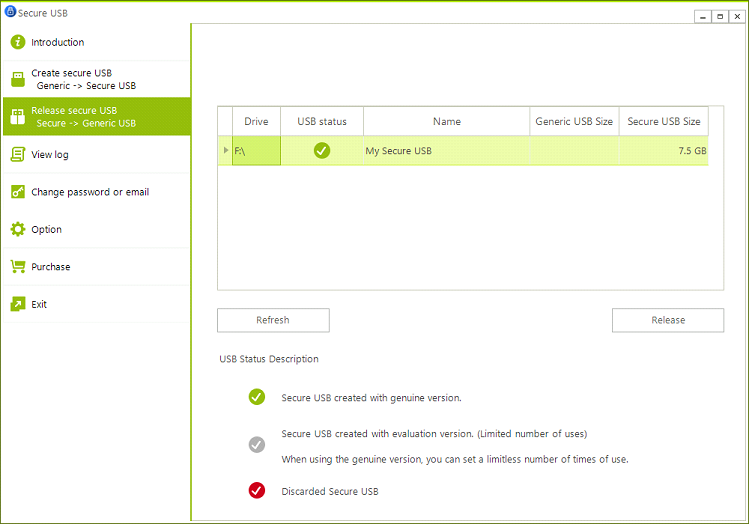
How to create Secure USB?
Insert a generic USB
Note: If there are files on the generic USB, deleted all files during the creation of the secure USB.
Click "Create Secure USB" Menu
Note: The secure USB is available 100 times when creating a secure USB as an evaluation version.
Set required option
| Internet connection required for secure USB | Internet connection is required when running a secure USB. |
| Password for read/write | If you log into a secure USB with this password, you can read or write files to secure USB. |
| Password for read-only | If you log into a secure USB with this password, you can only read files from USB |
| Expiration date | USB usage is prohibited after the specified expiration date. |
| Expiration count | After using the specified number of times, USB usage is prohibited. |
Reminder I
Of course, after purchasing a genuine ‘USB Safe Guard’ product, it can be changed to a genuine secure USB easily. There is no restriction in this case.
Reminder II
If the “Internet connection required for secure USB” option is set, the policy can be changed in the main program and this policy will be applied immediately when using a secure USB
How to run a Secure USB?
Created secure USB is available for Windows XP, 7, 8, 8.1, 10 and Windows Server 2008 R2 or later.
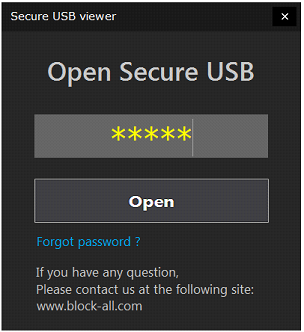
Insert a secure USB and run USBMain.exe program in the drive root.
If you enter the correct password on the screenshot below, Secure USB will be opened and be available.
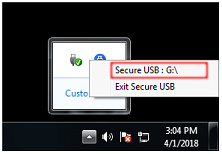
You can check which drive letter has been assigned to the secure USB from Tray Icon.
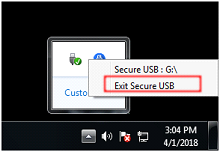
To stop using secure USB, select “Exit Secure USB” Menu from Tray Icon.
Supported O/S
 Windows